These robots know the value of keeping your hands on your instrument!
I’ve gotten up to speed on AI programming, and it didn’t hurt a bit. After learning the OpenAIchat and realtime APIs, I’m able to integrate generative AI text and speech into Caffeine. I got off to a good start by adding the ability to evaluate natural language with the same tools used to evaluate Smalltalk expressions in text editors. For my next application, I’m writing voice control for Ableton Live. This will let me keep my hands on a musical instrument instead of the keyboard or mouse while using Live.
This ties together my new realtime OpenAI client with an enabling technology I wrote previously: programmatic control of Live from a web browser. The musician speaks into a microphone, and a large language model translates their words into code that Caffeine can run on the Live API. With AI, the spoken commands can be relatively specific (“fade out at the end”) or very abstract (“use foreboding chords”).
The realtime OpenAI client uses a WebRTC audio channel to send spoken commands to the language model, and a WebRTC data channel to answer text as JSON data. I expect I’ll use system prompts instructing the model to respond using a domain-specific language (DSL) that can be run fairly directly by Caffeine. This will take the form of OpenAI tools that associate natural-language function descriptions with function signatures. The AI can deduce from conversational context when it should call a function, and the functions run locally (not on the OpenAI servers). I’ll define many functions that control various aspects of Ableton Live; prompts given by the musician will invoke them.
I imagine the DSL will be a distillation of the most commonly-used functions in Ableton Live’s very large API, and that it’ll emerge from real DAW use. What would you want to say to your DAW?
I’ve written a Caffeine app implementation of the Beatshifting algorithm, for collaborative remote music performance that is synchronized and out-of-phase. Beatshifting uses network latency as a rhythmic element, using offsets from beats as timestamps, with a shared metronome and score.
I was inspired to write the Beatshifting app by NINJAM, a similar system that has hosted many hours of joyous sessions. There are a few interesting twists I think I can bring to the technology, through late-binding of audio rendering.
NINJAM also synchronizes distributed streams of rhythmic music. It works by using a server to collect an entire measure of audio from the performers’ timestamped streams, stamps them all with an upcoming measure number, and sends them back to each performer. Each performer’s system plays the collected measures with the start times aligned. In effect, each performer plays along with what everyone else did a measure ago. Each performer must receive audio only by the start of the upcoming measure, rather than fast enough to create the illusion of simultaneity.
Beatshifting gives more control over the session to each performer, and to an audience as well. Each performer can modify not only the local volume levels of the other performers, but also their delays and instruments. Each performer can also change the tempo and time signature of the session. A session can have an audience as well, and each audience member is really a performer who hasn’t played anything yet.
It’s straightforward to have an arbitrary number of participants in a session because Beatshifting takes the form of a web app. Each participant only needs to visit a session link in a web browser, rather than use a special digital audio workstation (DAW) app. By default, Beatshifting uses MIDI event messages instead of audio, using much less bandwidth even with a large group.
To deliver events to each participant’s web browser, Beatshifting uses the Croquet replication service. Croquet is able to replicate and synchronize any JavaScript object in every participant’s web browser, up to 60 times per second. Beatshifting uses this to provide a shared score. Music events like notes and fader movements can be scheduled into the score by any participant, and from code run by the score itself.
One piece of code the score runs broadcasts events indicating that measures have elapsed, so that the web browsers can render metronome clicks. There are three kinds of metronome clicks, for ticks, beats, and measures. For example, with a time signature of 6/8, there are two beats per measure, and three ticks per beat. Each tick is an eighth-note, so each beat is a dotted-quarter note. The sequence of clicks one hears is:
measure
tick
tick
beat
tick
tick
At a tempo of 120 beats per minute, or 240 clicks per 60,000 milliseconds, there are 250 milliseconds between clicks. Each time a web browser receives a measure-elapsed event, it schedules MIDI events for the next measure’s clicks with the local MIDI output interface. Since each web browser knows the starting time of the session in its output MIDI interface’s timescale, it can calculate the timestamps of all ensuing clicks.
When a performer plays a note, their web browser notes the offset in milliseconds between when the note was played and the time of the most recent click. The web browser then publishes an event-scheduling message, to which the score is subscribed. The score then broadcasts a note-played event to all the web browsers. Again, it’s up to each web browser to schedule a corresponding MIDI note with its local MIDI output interface. The local timestamp of that note is chosen to be the same millisecond offset from some future click point. How far in the future that click is can be chosen based on who played the note, or any other element of the event’s data. Each web browser can also choose other parameters for each event, like instrument, volume level, and panning position.
Quantities like tempo are part of the score’s state, and can be changed by any performer or audience member. Croquet ensures that the changed JavaScript variables are synchronized in all the participants’ web browsers.
With so many decisions about how music events are rendered left to each web browser, the mix that each participant hears can be wildly different. The only constants are the millisecond beat offsets of each performer’s notes. I think it’ll be fun to compare recordings of these mixes after the fact, and to make new ones from individual recorded tracks.
There’s no server that any participant needs to set up, and the Croquet service knows nothing of the Beatshifting protocol. This makes it very easy to start and join new sessions.
next steps
The current Beatshifting UI has controls for joining a session, enabling the local scheduling of metronome clicks, and changing the tempo and time signature of a session.
the current Beatshifting UI
If one is using a MIDI output interface connected to a DAW, then one may use the DAW to control instruments, volume, panning, and so on. I’d also like to provide the option of all MIDI event rendering performed by the web browser, and a UI for controlling and recording that. I’ve established the use of the ToneJS audio framework for rendering events, and am now developing the UI.
I led a debut performance of Beatshifting as part of the Netherlands Coding Live concert series, on 23 April 2021.
I’ve written an animated 3D visualization of the Beatshifting algorithm, which can be driven from live session data. This movie is an annotated slow-motion version:
visualizing the Beatshifting algorithm
I’m excited about the creative potential of Beatshifting sessions. Please contact me if you’re interested in playing or coding for this medium!
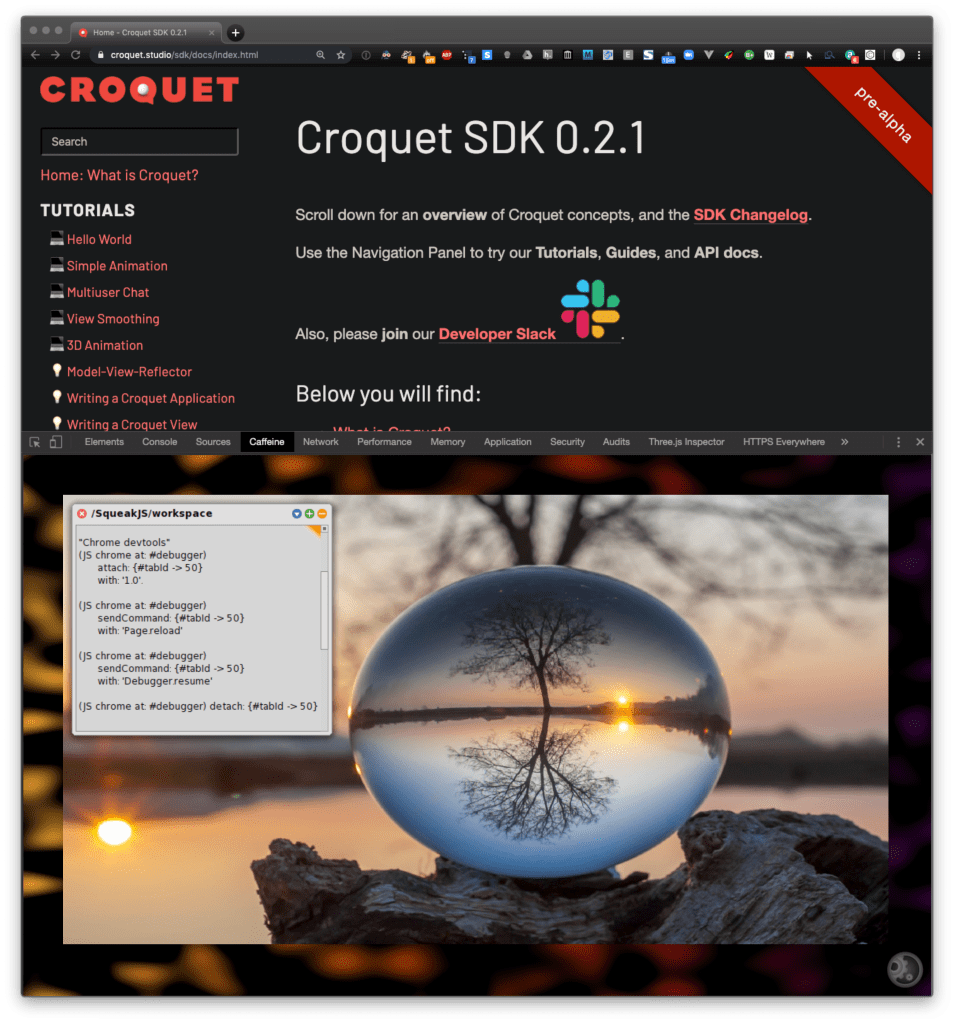
With the latest version of the Caffeine Chrome extension, you can run Caffeine in a Chrome DevTools panel, with access to all the Chrome debugging APIs. I’ve been using it to explore the Netflix video player, for an app I’m writing that enables the viewer to edit narratives by rearranging scenes.
From a quick look at the DOM element tree for the player, it’s apparent that it’s a React app. By following a reference chain from a user interface element (like the skip-forward button), through the bound “this” object of its click-event listener, I found the internal React properties for all the player’s UI elements, and all the player functions they use (for example, for seeking forward in a video).
With those functions in hand, I made a Netflix player class in Smalltalk, which can manipulate the Netflix player React app interactively from Smalltalk code. Other objects I made representing show elements (like scenes, episodes, seasons, and series) can use my player to compile analytic information about shows, and present them in different ways. For example, you could watch an episode of Better Call Saul consisting only of scenes that include a certain character, or that take place at a certain location, or with flashbacks placed in chronological order. This is for a webapp I’m writing called Arc.
I’m eager to see what else you explore using the Caffeine extension in the DevTools!
Caffeine running as a Chrome DevTools panel, debugging the Croquet Studios site, with Hydra graphics in the background.
I’ve updated the Caffeine Chrome extension in the Chrome Web Store. This version, 77.1, makes the entire Caffeine user interface available as a Chrome DevTools panel, and can access all of the Chrome APIs. With Hydra graphics support included, it’s the most convenient and geeky way to access Caffeine, perfect for your next Algorave. :)
I wrote a new website for Black Page Digital, my consultancy in Amsterdam and San Francisco. It features a running Squeak Smalltalk that you can use for livecoding. Please check it out, pass it on, and let me know what you think!
Posted in Appsterdam, music on 19 August 2012 by Craig Latta
Seven measures of “pulse” synchronized with the original arrangement, slowed to quarter-speed, and turned into an infinite seamless loop. Works great for sleep.



 thisContext