Archive for the SqueakJS Category

livecoding new AI skills with conversational MCP

Posted in Appsterdam, Caffeine, consulting, Context, livecoding, Smalltalk, SqueakJS with tags , , , , , , , , , , on 24 September 2025 by Craig Latta
A person is speaking, indicated by a speech balloon full of colorful sprockets. A robot, with a head full of colorful sprockets, has grabbed one of the spoken sprockets.
Through conversation, we can add skills to a model as new MCP tools.

The Model Context Protocol gives us a way to extend the skills of an LLM, by associating a local function with natural-language descriptions of what it does, and making that tool available as additional conversational context. Once the model can infer from conversation that a tool should be used, it invokes the tool’s function via the protocol. Tools are made available by an MCP server, augmenting models with comprehensive sets of related skills. There are MCP servers for filesystem access, image processing, and many other domains. New registries are emerging to provide MCP server discovery, and old ones (like npm) are becoming good sources as well.

For someone who can create the underlying tool functions, a personal MCP server can supercharge a coding assistant with project-specific skills. I’ve added an MCP server proxy to my Caffeine server bridge, enabling a Smalltalk IDE running in a web browser to act as an MCP server, and enhancing the AI conversations that one may have in the IDE. I can dynamically add tools, either through conversation or in Smalltalk code directly.

anatomy of an MCP tool

In modeling an MCP tool, we need to satisfy the denotational requirements of both the protocol (to enable model inference) and the environment in which the functions run (to enable correct function invocation). For the protocol, we must provide a tool name and description, and schemas for the parameters and the result. For the Smalltalk environment, we need the means to derive, from invocation data, the components of a message: a receiver, selector, and parameters.

In my implementation, an instance of class FunctionAITool has a name, description, result, parameters, selector, and a receiver computation. The receiver computation is a closure which answers the intended receiver. Each of the parameters is an instance of class FunctionAIToolParameter, which also has a name and description, as well as a type, a boolean indicating whether it is required, and a parameter computation similar to the receiver computation. The tool’s result is also a FunctionAIToolResult, which can have a result computation but typically doesn’t, since the computation is usually done by the receiver performing the selector with the parameters. The result computation can be used for more complex behavior, extending beyond a single statically-defined method.

The types of the result and each parameter are usually derived automatically from pragmas in the method of the receiver named by the selector. (The developer can also provide the types manually.) These pragmas provide type annotations similar to those used in generating the WebAssembly version of the Smalltalk virtual machine. The types themselves come from the JSON Schema standard.

routing MCP requests from the model to the environment

Caffeine is powered by SqueakJS, Vanessa Freudenberg’s Smalltalk virtual machine in JavaScript. In a web browser, there’s no built-in way to accept incoming network connections. Using Deno integration I wrote, a server script acts as a proxy for any number of remote peers with server behavior, connected via websockets. In the case of MCP, the script can service some requests itself (for example, during the initialization phase). The script also speaks Caffeine’s Tether remote object messaging protocol, so it can forward client requests to a remote browser-based Caffeine instance using remote messages. That Caffeine instance can service requests for the tools list, and for tool calls. The server script creates streaming SSE connections, so that both client and server can stream notifications to each other over a persistent connection.

Caffeine creates its response to a tools list request by asking each tool object to answer its metadata in JSON, and aggregating the responses. To service a tool call, if the tool has a selector, it uses the receiver computation to get a receiver, and the parameter computations to both validate each client-provided parameter and derive an appropriate Smalltalk object for it. Now the receiver can perform the tool’s selector with the parameters. If the tool has a result computation instead of a selector, the tool will evaluate it with the derived parameters. A tool’s result can be of a simple JSON type, or something more sophisticated like a Smalltalk object ID, for use as an object reference parameter in a future tool call.

conversational tool reflection

For simple tools, it’s sometimes useful to keep development entirely within a conversation, without having to bring up traditional Smalltalk development tools at all. There’s not much motivation for this when the conversation is in a Smalltalk IDE, where conversations can happen anywhere one may enter text, and the Smalltalk tools are open anyway. But it can transform a traditional chatbot interface.

This extends to the development of the tools themselves. I’ve developed a tool that can create and edit new tools. I imagine conversations like this one:
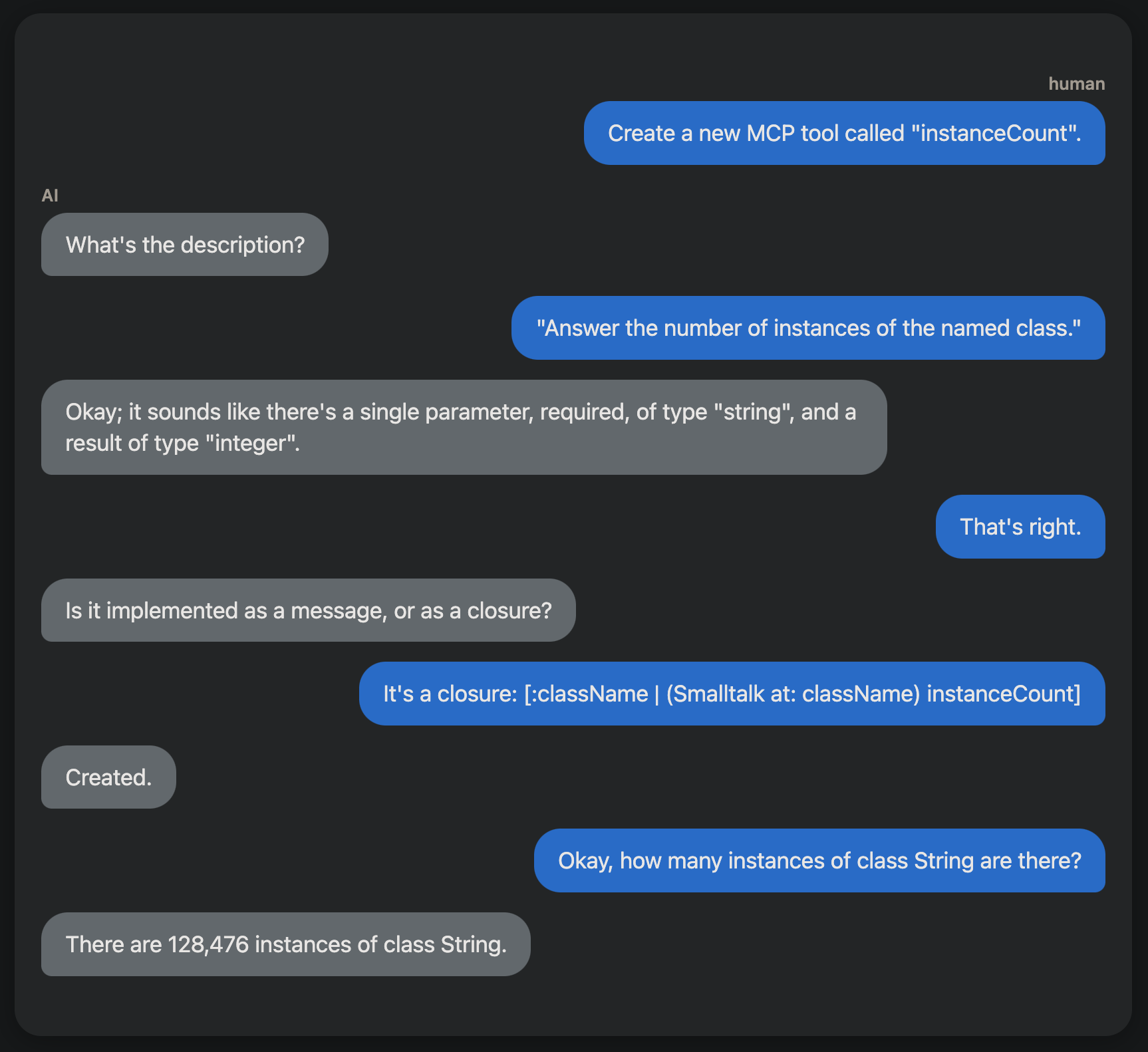
Creating a new MCP tool through conversation.

What would you do with it?

This capability could enable useful Smalltalk coding assistants. I’m especially keen to see how we might create tools for helping with debugging. What would you do?

Catalyst phase four: decompiling the virtual machine simulator to WebAssembly as it runs

Posted in Appsterdam, consulting, Context, livecoding, Smalltalk, Spoon, SqueakJS with tags , , , , , , , on 10 September 2025 by Craig Latta
A person operating a marionette, who is himself a marionette, operated by a hand of unknown provenance. Copyright (c) 2025 Craig Latta.
Through simulation, we can specify the behavior of the virtual machine exactly.

I’m writing phase four of the Catalyst Smalltalk virtual machine, producing a WASM GC version of the virtual machine from a Smalltalk implementation. WASM GC is statically typed. While I prefer the dynamically-typed livecoding style of Smalltalk, I want the WASM GC representation to be thoroughly idiomatic. This presents an opportunity to revisit the process of generating code from the virtual machine simulation; we can use the simulation to be precise about types, while livecoding Smalltalk as before.

imprinting returns

As part of earlier work I did to produce a minimal object memory, I developed a facility for imprinting behavior (methods) onto one system from another, as a side-effect of running them. We can use a similar technique to imprint the methods of a virtual machine simulation onto WASM GC code files. This affords some interesting possibilities. If we construct a minimal object memory as part of the simulation, we can ensure the virtual machine is also minimal, containing only the code necessary for running that object memory. That might have useful security properties.

We also have the traditional correctness proof that a virtual machine generated from its simulation gives us. The generated virtual machine can run that object memory, since the simulation could run it. But by imprinting the generated virtual machine from a running simulation, rather than statically, we have also have a stronger proof of type correctness. We don’t need to infer types, since we have live objects from the simulation at hand. This lets Catalyst take full advantage of the optimizations in the WASM GC development environment (e.g., ‘wasm-opt‘) and runtime environment (e.g., V8). It’s also easier to create fast virtual machines for particular debugging situations; you can change a running simulation that has come upon a problem, and generate the corresponding WASM virtual machine module quickly.

the details

This approach is enabled by more of my previous work. The interpretation of compiled methods is done by reified virtual machine instructions (“bytecodes”). Those instructions are initialized using the Epigram parsing and compilation framework I wrote. Epigram uses reified BNF grammar production rules to parse source code, and to form an abstract syntax tree. Each instruction has a code generator object corresponding to the language element it manipulates (e.g., an instance variable). Each code generator has a copy of the production rule that justifies the existence of the language element.

For example, in the Smalltalk grammar, a pseudo-variable reference (“self”, “super”, or “thisContext”) is parsed by the PseudoVariableReference production rule, a shared variable in a pool dictionary of Smalltalk production rules. A ReturnReceiver instruction has a SmalltalkReceiver code generator, which in turn has a copy of the PseudoVariableReference rule. Production rule copies are used to do the actual work of parsing a particular source; they hold parsed data (e.g., the characters for “self”), also known as terminals. The original production rule objects exist solely to define a grammar.

After being initialized from the rules used to parse the source code of a Smalltalk method, instruction objects can assist a virtual machine and its active context with interpretation. They can also generate source code, either in Smalltalk or some other language, with the assistance of their code generators. For WASM GC, code generation happens during interpretation, so that the types of all variables and return values are known concretely, and generation can be contingent on successful type validation.

type annotation and representation

For this approach to work, we need a source for that type information. I use pragmas contained in the methods of the simulation. Each Smalltalk method that will be translated to a WASM GC function has a pragma for each parameter and temporary variable, and another for the return value (if the WASM GC function is to have a return value). Every Smalltalk method leaves an object of some sort on the stack, even it’s just the receiver, but a WASM GC function may not.

A typical temporary variable pragma looks like this:

<local: #index type: #i32 attributes: #(mutable nullable)>

This corresponds to the semantics of local variables in a WASM GC function. Each one is declared with the “local” WASM GC instruction, and has a name, a type, and two attributes. A variable is mutable if its value can be changed after initialization, and nullable if its value can be null (a null of an appropriate type, of course). A variable can either have or not have each of those attributes.

WASM GC has a few built-in types, like “i32” for 32-bit integers. For reference (pointer) types, we write “(ref $type)”, where “type” is defined elsewhere in the source file. We define reference types for each kind of structure (“struct”) we’ll be using in the simulation, also by using method pragmas. Each class in the simulation has a “type” method which defines those pragmas. Just as there’s a format for variable type annotation pragmas, there’s another for struct type annotation, using “field:” instead of “local:”.

When we send “type” to a struct class, we get a type signature, a specialized dictionary created from those pragmas. A signature object is similar to a JavaScript object, in that we can send a message named for a desired field’s key, and the signature will answer the value it has for that key. Signatures are ordered dictionaries, since the order of variables in a function or fields in a struct type is crucial. Unlike JavaScript objects or Smalltalk dictionaries, signatures can have multiple values for the same key. This enables us to evaluate an expression like (VirtualMachine type field) to get an OrderedCollection of the fields in VirtualMachine’s type signature.

Signature objects are implemented by classes descended from PseudoJSObject, a Smalltalk implementation of JavaScript object semantics that inherits from OrderedDictionary. There are further specializations for different kinds of signatures, for functions, variables, and structs.

virtual machine generation in action

The preliminaries of the WASM GC source file for the virtual machine are written by the VirtualMachine itself. This includes all the reference type definitions, and definitions for functions and variables that Catalyst will import from and export to a webpage that’s running it. It also includes translations of the methods used to create the object memory. After interpretation begins, every time the VirtualMachine is about to interpret an instruction, it translates the methods run to interpret the previous instruction.

The VirtualMachine knows which methods have been run by using the method-marking facility I wrote about in “The Big Shake-Out”. When the system runs a compiled method, it sets a field in the method to an increasing counter value. In the object memory, one can ask the method for the value of that field, and one can set the field to zero. We can zero that field in every method at some initial time, run the system, and get a collection of every method that was run in the meantime, ordered by how recently they were run.

exemplar object memories

The object memory I’m running in the simulation is the same one I created in the initial handwritten version of the WASM GC virtual machine. It runs a simple polynomial benchmark method that could be optimized into a much more efficient WASM GC function by AI, and also demonstrates method caching and just-in-time compilation. We could develop formalisms for composing this object memory. Through the rigorous use of unit tests, we could produce object memories that exercise every instruction and primitive exhaustively, and act as minimal harnesses for benchmarks.

next: phase five, object memory snapshots

After the WASM GC virtual machine is free of handwritten WASM GC code, I’ll implement the ability to write and resume object memory snapshots. See you then!

A new adventure: mechanistic interpretability

Posted in Appsterdam, Caffeine, consulting, Context, livecoding, Smalltalk, SqueakJS with tags , , , , , , , , on 11 August 2025 by Craig Latta
What if we could compose LLMs from reusable circuits?

It’s always bugged me that we can’t explain how large language models do what they do. It makes the models difficult to trust, possibly unsafe to operate, and very difficult to train. If we could identify cognitive structures within a model, perhaps we could compose other models from them, avoiding much of the expense and haphazard nature of our current practice. This is the domain of mechanistic interpretability (MI).

I’ve started a new project to explore this, my attempt to discover circuits and other reusable cognitive structures in LLMs, using interactive tools that visualize what goes on in an LLM as it runs.

interactive inspection inside the minds of models

The project (as yet unnamed) is a livecoded browser-based MI framework, with which I hope to make the field more accessible to everyone. Inspired by TransformerLens and the work of Anthropic, I want to make model inspection easier to start, and more interactive. I also want to help build the MI community, specifically through sharing of results and standardization of circuit expressions. I think we can bring about a new era in transformer-based AI, through the composition of models from reusable circuits, rather than brute-force training from ever-larger sets of questionable training data. We can also pursue increased symbiosis between MI and knowledge representation research.

With current tools, MI remains laborious. Setting up frameworks like TransformerLens is difficult, often requiring complex Python environments with extensive configuration. Access to powerful local GPUs is an absolute requirement. Sharing results with other researchers requires everyone to replicate a complex environment. Worst of all, experiments must be run as large batches of computation, and visualizations are static, making it difficult to develop intuition about model behavior.

While there is a small server setup, the app runs in a web browser; there is no front-end setup. The server and its GPUs need not be local. The architecture lends itself to operation as a service for many researchers at once. Once started, the UI provides access to everything as first-class objects that can be inspected, modified, and composed interactively. Internal model structures become tangible. With the addition of web synchronization frameworks like Multisynq, multiple researchers can explore and share insights about the same live model.

Let’s Collaborate

If you’re a mechanistic interpretability researcher, or are just interested in the topic, please contact me. I’d love to discuss how we might collaborate on this!

AI-assisted just-in-time compilation in Catalyst

Posted in Appsterdam, Caffeine, consulting, Context, livecoding, Smalltalk, Spoon, SqueakJS with tags , , , , , , , , on 22 July 2025 by Craig Latta
AI can help us find the “desire paths” in stack instructions.

There’s a long tradition of just-in-time compilation of code in livecoding systems, from McCarthy’s LISP systems in the 1960s, to the dynamic method translation of the Deutsch-Schiffman Smalltalk virtual machine, to the “hotspot” compilers of Self, Strongtalk and Java, to current implementations for JavaScript and WebAssembly in Chrome’s V8 and Firefox’s SpiderMonkey. Rather than interpret sequences of virtual machine instructions, these systems translate instruction sequences into equivalent (and ideally more efficient) actions performed by the instructions of a physical processor, and run those instead.

We’d like to employ this technique with the WASM GC Catalyst Smalltalk virtual machine as well. Translating the instructions of a Smalltalk compiled method into WASM GC instructions is straightforward, and there are many optimizations we can specify ahead of time for optimizing those instructions. But with the current inferencing abilities of artificial intelligence large language models (LLMs), we can leave even that logic until runtime.

dynamic method translation by LLM

Since Catalyst runs as a WASM module orchestrated by SqueakJS in a web browser, and the web browser has JavaScript APIs for WASM interoperation, and there are JS APIs for interacting with LLMs, we can incorporate LLM inference in our translation of methods to WASM functions. We just need an expressive system for composing appropriate prompts. Using the same Epigram compilation framework that enables the decompilation of the Catalyst virtual machine itself into WASM GC, we can express method instructions in a prompt, by delegating that task to the reified instructions themselves.

For an example, let’s take the first method developed for Catalyst to execute, SmallInteger>>benchmark, a simple but sufficiently expensive benchmark. It repeats this pattern five times: add one to the receiver, multiply the result by two, add two to the result, multiply the result by three, add three to the result, and multiply the result by two. This is trivial to express as a sequence of stack operations, in both Smalltalk instructions and WASM instructions.

Our pre-written virtual machine code can do the simple translation between those instruction sets without using an LLM at all. With a little reasoning, an LLM can recognize from those instructions that something is being performed five times, and write a loop instead of inlining all the operations. With a little more reasoning, it can do a single-cycle analysis and discover the algebraic relationship between the receiver and the output (248,832n + 678,630). That enables it to write a much faster WASM function of five instructions instead of 62.

the future

This is a contrived example, of course, but it clearly shows the potential of LLM-assisted method translation, at least for mathematical operations. I’ve confirmed that it works in Catalyst, and used the results to populate a polymorphic inline cache of code to run instead of interpretation. Drawing inspiration from the Self implementation experience, what remains to be seen is how much time and money is appropriate to spend on the LLM. This can only become clear through real use cases, adapting to changing system conditions over time.

Catalyst update: a WASM GC Smalltalk virtual machine and object memory are running

Posted in Appsterdam, Caffeine, consulting, Context, livecoding, Naiad, Smalltalk, Spoon, SqueakJS with tags , , , , , , , , , on 29 June 2025 by Craig Latta
The core of the mechanism is working.

I’ve bootstrapped a Smalltalk virtual machine and object memory as a WebAssembly (WASM) module, using the type system that supports garbage collection there. I have two motivations for doing this: I’d like to see how fast it can run, and I’d like to see how it can interoperate with other WASM modules in diverse settings, including web browsers, servers, and native mainstream OS apps.

the current test: evaluating (3 squared)

The very first thing I ran was a method adding three and four, reporting the result through a webpage. This required types and classes for Object, SmallInteger, ByteArray, Dictionary, Class, CompiledMethod, Context, and Process, a selectors for #+, and functions for interpreting bytecodes, creating arrays, dictionaries, contexts, and the initial object memory, manipulating dictionaries, stacks, contexts, and for reporting results to JavaScript.

Evaluating (3 + 4) only uses an addition bytecode, instead of actually sending a message. After I got a successful result, I changed the expression to (3 squared). This tested sending an actual message, creating a context for the computation, invoking a method different from the one sending the message.

Using WASM’s JavaScript interoperation facilities, I export two WASM functions to JS for execution in a web browser: createMinimalBootstrap() and interpret(). The createMinimalBootstrap function creates classes, selectors, an unbound method that sends “squared” and an initial context for it, and a “squared” method installed in class SmallInteger, and initializes interpreter state.

With the interpreter and object memory set up, JS can tell the WASM module to start interpreting bytecodes, with interpret(). The initial unbound method, after the bytecodes for performing (3 squared), has a special bytecode for reporting the result to JS. It calls a JS function imported from the webpage, which simply prints the result in the webpage. The webpage also reports how long the interpreter takes to run; it might be interesting when measuring the speed of methods compiled to WASM functions.

the interpreter

the SqueakWASM virtual machine returning a result to JavaScript

The interpreter implements all the traditional Smalltalk bytecodes, and a few more for interoperating with JavaScript. Smalltalk objects are represented with WASM GC reference types: i31refs for SmallIntegers, and structrefs for all other objects. There is a type hierarchy mirroring the Smalltalk classes used in the system. With all objects implemented as reference types, rather than as byte sequences in linear WASM memory, we can leverage WASM’s garbage collector. This is similar to the way SqueakJS leverages the JS runtime engine’s garbage collector in a web browser. Also like SqueakJS, SmallIntegers larger than a signed 31-bit integer are boxed LargeIntegers, as WASM GC doesn’t yet have a built-in reference type for 63-bit signed integers.

the next test: just-in-time compilation of methods to WASM

Now that I can run SmallInteger>>squared as interpreted bytecodes, I’ll write a rudimentary translator from bytecode sequences to WASM functions. It may provide an interesting micro-benchmark for comparing execution speeds.

future work: reading snapshots and more

Obviously, a Smalltalk virtual machine does many things; this is a tiny but promising beginning. In the near future, I’d like to support reading existing Squeak, Pharo, and Cuis object memories, provide more extensive integration with device capabilities through JavaScript, web browsers, and WASI, and support the Sista instruction set for compatibility with the OpenSmalltalk Cog virtual machine. I’m especially interested to see how SqueakWASM might integrate with other WASM modules in the wild.

What would you do with WASM Smalltalk? Please let me know!

a Tethered server-side display

Posted in Appsterdam, Caffeine, consulting, Context, livecoding, Smalltalk, SqueakJS with tags , , , , , , , on 18 May 2025 by Craig Latta
Server-side Caffeine can display in your web browser.

Tether is Caffeine‘s remote messaging protocol. It enables messaging between multiple Caffeine systems running in web browsers, other JavaScript runtimes, or native apps, using TCP sockets, Web Sockets, or WebRTC data channels. With the Deno JavaScript runtime, Caffeine can run server-side in a Web Worker thread, with the main thread providing a websocket for Caffeine to use, and acting as a bridge for Tether traffic between the worker and connected clients. Every system speaking the protocol does so with a local instance of class Tether.

Usually, the services provided by the worker Caffeine don’t involve graphics, and the system is headless. However, we can also perform all the traditional graphics behavior, using a remote Caffeine instance as the display.

a networked graphics pipeline

The main Deno thread, the bridge, communicates with the Caffeine worker thread through message handlers invoked on each side with postMessage(). The bridge communicates with a client Caffeine system over a websocket, TCP socket, or WebRTC data channel. The key to remote display is in the worker’s implementation of interpreter.showFormAt():

When the system is headless, the HMTL canvas graphics context that would normally be used for image data is null. The interpreter instead uses postMessage() to pass the pixel data to the bridge. The bridge can then broadcast those pixels to interested clients. Normally, the bridge only relays remote messages and their answers amongst the worker and the clients. We can consider a display update as the parameter for an invocation of a virtual block closure callback, handled specially by each receiving Tether. When such an update is received by a system hosted in a web browser, the Tether puts image data to the graphics context of a local HTML canvas, just as the original system would have done normally. The worker’s BitBLT is invoked normally to calculate the pixels, and can use WebAssembly to speed things up.

on-demand display enables livecoded server development

When the worker is truly headless, with no graphics-interested clients connected to the bridge, we don’t have to pay the cost of BitBLT/WASM graphics calculations. We can tell from the worker’s Smalltalk object memory that the system is headless, and avoid even asking the interpreter to calculate pixels. But a display can be provided on demand, enabling the livecoding of server apps. This makes the development process much more efficient, by eliminating the loops of implementation and testing that an always-headless server would cause.

With this ability, I’m writing a dynamic MCP server framework that accepts websocket connections from AI models, and mediates model communication with the subject app. Being able to livecode this will provide further efficiency benefits, by never having to interrupt the model’s interaction with either the MCP server or the subject app.

What would you use it for?

a voice-controlled Ableton Live

Posted in Appsterdam, Caffeine, consulting, Context, livecoding, music, Smalltalk, SqueakJS with tags , , , , , , , , , , on 5 January 2025 by Craig Latta
These robots know the value of keeping your hands on your instrument!

I’ve gotten up to speed on AI programming, and it didn’t hurt a bit. After learning the OpenAI chat and realtime APIs, I’m able to integrate generative AI text and speech into Caffeine. I got off to a good start by adding the ability to evaluate natural language with the same tools used to evaluate Smalltalk expressions in text editors. For my next application, I’m writing voice control for Ableton Live. This will let me keep my hands on a musical instrument instead of the keyboard or mouse while using Live.

This ties together my new realtime OpenAI client with an enabling technology I wrote previously: programmatic control of Live from a web browser. The musician speaks into a microphone, and a large language model translates their words into code that Caffeine can run on the Live API. With AI, the spoken commands can be relatively specific (“fade out at the end”) or very abstract (“use foreboding chords”).

The realtime OpenAI client uses a WebRTC audio channel to send spoken commands to the language model, and a WebRTC data channel to answer text as JSON data. I expect I’ll use system prompts instructing the model to respond using a domain-specific language (DSL) that can be run fairly directly by Caffeine. This will take the form of OpenAI tools that associate natural-language function descriptions with function signatures. The AI can deduce from conversational context when it should call a function, and the functions run locally (not on the OpenAI servers). I’ll define many functions that control various aspects of Ableton Live; prompts given by the musician will invoke them.

I imagine the DSL will be a distillation of the most commonly-used functions in Ableton Live’s very large API, and that it’ll emerge from real DAW use. What would you want to say to your DAW?

Context-Aware AI Conversations in Smalltalk

Posted in Appsterdam, Caffeine, consulting, Context, livecoding, Smalltalk, SqueakJS with tags , , , , , , , , , , on 3 December 2024 by Craig Latta
There’s a lot of Smalltalk knowledge in the pre-training data of most LLMs.

I’ve been stumbling toward a “good enough” understanding of Smalltalk by an AI large language model, and Smalltalk tools for integrating conversations into the workflow. So far, I’ve been doing this through model fine-tuning with English system prompts, without resorting to code at all. I’ve been impressed with the results. It seems the pre-training that the OpenAI gpt-4o model has about Smalltalk and Squeak is a decent basis for further training. I evolve the prompts in response to chat completion quality (usually by applying more constraints, like “When writing code, don’t send a message to access an object when you can access it directly with an instance variable.”).

I wanted to converse with the language model from any text pane in Squeak, via the classic “do it”, “print it”, and “inspect it” we’re used to using with Smalltalk code. I changed Compiler>>evaluateCue:ifFail: to handle UndeclaredVariable exceptions, by delegating to the model object underlying the text pane in use. (It’s usually an UndeclaredVariable exception that happens first when one attempts to evaluate an English phrase. For example, “What” in “What went wrong?” is unbound.) That model object, in turn, handles the exception by interpreting the next chat completion from the language model.

The model objects I’ve focused on so far are instances of Debugger and Inspector. One cute thing about this approach is that it records do-its for English prompts just like it does for Smalltalk code, in the changes log. Each model can supply its own system prompts to orient conversations, and can interpret chat completions in a variety of ways (like running Smalltalk code written by the language model). Each model object also keeps a reference to its most recent chat completion, so that successive prompts are submitted to the language model in the context of the complete conversation so far.

With all this in place, evaluating “What went wrong?” in a debugger text pane gives surprisingly correct, detailed, and useful answers. Running the code answered to “Write code for selecting the most recent context with a BlockClosure receiver.” manipulates the debugger correctly.

Next, I’m experimenting with prompts for describing an application’s domain, purpose, and user interface. I’m eager to see where this leads. :)

dynamic translation of Smalltalk to WebAssembly

Posted in Caffeine, consulting, Context, livecoding, Smalltalk, Spoon, SqueakJS with tags , , , , , , , on 26 July 2023 by Craig Latta
continuing with the DNA theme…

In Catalyst, a WebAssembly implementation of the OpenSmalltalk virtual machine, there are three linguistic levels in play: Smalltalk, JavaScript (JS), and WebAssembly (WASM). Smalltalk is our primary language, JS is the coordinating language of the hosting environment (a web browser), and WASM is a high-performance runtime instruction set to which we can compile any other language. In a previous article, I wrote about automatic translation of JS to WASM, as a temporary way of translating the SqueakJS virtual machine to WASM. That benefits from a proven JS starting point for the relatively large codebase of the virtual machine. When translating individual Smalltalk compiled methods for “just-in-time” optimization, however, it makes more sense to translate from Smalltalk to WASM directly.

compiled method transcription

We already have infrastructure for transcribing Smalltalk compiled methods, via class InstructionStream. We use it to print human-readable descriptions of method instructions, and to simulate their execution in the Smalltalk debugger. We can also use it to translate a method to human-readable WebAssembly Text (WAT) source code, suitable for translation to binary WASM code which the web browser can execute. Since the Smalltalk and WASM instruction sets are both stack-oriented, the task is straightforward.

I’ve created a subclass of InstructionStream, called WATCompiledMethodTranslator, which uses the classic scanner pattern to drive translation from Smalltalk instructions to WASM instructions. With accompanying WASM type information for Smalltalk virtual machine structures, we can make WASM modules that execute the instructions for individual Smalltalk methods.

the “hello world” of Smalltalk: 3 + 4

As an example, let’s take a look at translating the traditional first Smalltalk expression, 3 + 4. We’ll create a Smalltalk method in class HelloWASM from this source:

HelloWASM>>add
	"Add two numbers."

	^3 + 4

This gives us a compiled method with the following Smalltalk instructions. On each line below, we list the program counter value, the instruction, and a description of the instruction.

0: 0x20: push the literal constant at index 0 (3) onto the method's stack
1: 0x21: push the literal constant at index 1 (4) onto the method's stack
2: 0xB0: send the arithmetic message at index 0 (+)
3: 0x7C: return the top of the method's stack

A WATCompiledMethodTranslator uses an instance of InstructionStream as a scanner of the method, interpreting each Smalltalk instruction in turn. When interpreting an instruction, the scanner sends a corresponding message to the translator, which in turn writes a transcription of that instruction as WASM instructions, onto a stream of WAT source.

The first instruction in the method is “push the literal constant at index 0”. The scanner finds the indicated literal in the literal frame of the method (i.e., 3), and sends pushConstant: 3 to the translator. Here are the methods that the translator runs in response:

WATCompiledMethodTranslator>>pushConstant: value
	"Push value, a constant, onto the method's stack."

	self
		comment: 'push constant ', value printString;
		pushFrom: [value printWATFor: self]
WATCompiledMethodTranslator>>pushFrom: closure
     "Evaluate closure, which emits WASM instructions that push a value onto the WASM stack. Emit further WASM instructions that push that value onto the Smalltalk stack."

	self
		setElementAtIndexFrom: [
			self
				incrementField: #sp
				ofStructType: #vm
				named: #vm;
				getField: #sp
				ofStructType: #vm
				named: #vm]
		ofArrayType: #pointers
		named: #stack
		from: closure
WATCompiledMethodTranslator>>setElementAtIndexFrom: elementIndexClosure ofArrayType: arrayTypeName named: arrayName from: elementValueClosure
	"Evaluate elementIndexClosure to emit WASM instructions that leave an array index on the WASM stack. Evaluate elementValueClosure to emit WASM instructions that leave an array element value on the WASM stack. Emit further WASM instructions, setting the element with that index in an array of the given type and variable name to the value."

	self get: arrayName.
	{elementIndexClosure. elementValueClosure} do: [:each | each value].

	self
		indent;
		nextPutAll: 'array.set $';
		nextPutAll: arrayTypeName

In the final method above, we finally see a WASM instruction, array.set. The translator implements stream protocol for actually writing WAT text to a stream. The comment:, get:, and getField:ofStructType:named: methods are similar, using “;;” and the array.get and struct.get WASM instructions. The array and struct instructions are part of the WASM garbage collection extension, which introduces types.

WASM types for virtual machine structures

To actually use WASM instructions that make use of types, we need to define the types in our method’s WASM module. In pushFrom: above, we use a struct variable of type vm named vm, and an array variable of type pointers named stack. The vm variable holds global virtual machine state (for example, the currently executing method’s stack pointer), similar to the SqueakJS.vm variable in SqueakJS. The stack variable holds an array of Smalltalk object pointers, constituting the current method’s stack. In general, the WASM code for a Smalltalk method will also need fast variable access to the active Smalltalk context, the active context’s stack, the current method’s literals, and the current method’s temporary variables.

Our WASM module for HelloWASM>>add might begin like this:

(module
	(type $bytes (array (mut i8)))
 	(type $words (array (mut i32)))
 	(type $pointers (array (ref $object)))

 	(type $object (struct
		(field $metabits (mut i32))
		(field $class (ref $object))
		(field $format (mut i32))
		(field $hash (mut i32))
		(field $pointers (ref $pointers))
		(field $words (ref $words))
		(field $bytes (ref $bytes))
		(field $float (mut f32))
		(field $integer (mut i32))
		(field $address (mut i32))
		(field $nextObject (ref $object))))

	(global $vm (struct
		(field $sp (mut i32))
		(field $pc (mut i32)))

	(global $stack (array (ref $pointers)))

	(function $HelloWASM_add
		;; pc 0
		;; push constant 3
		global.get $stack
		global.get $vm
		global.get $vm
		struct.get $vm $sp
		i32.const 1
		i32.add
		struct.set $vm $sp ;; increment the stack pointer
		global.get $vm
		struct.get $vm $sp
		i32.const 3
		array.set $pointers
		
		;; pc 1
		...

As is typical with assembly-level code, there’s a lot of setup involved which seems quite verbose, but it enables fast paths for the execution machinery. We’re also effectively taking on the task of writing the firmware for our idealized Smalltalk processor, by setting up interfaces to contexts and methods, and by implementing the logic for each Smalltalk instruction. In a future article, I’ll discuss the mechanisms by which we actually run the WASM code for a Smalltalk method. I’ll also compare the performance of dynamic WASM translations of Smalltalk methods versus the dynamic JS translations that SqueakJS makes. I don’t expect the WASM translations to be much (or any) faster at the moment, but I do expect them to get faster over time, as the WASM engines in web browsers improve (just as JS engines have).

automated translation of JavaScript to WebAssembly for SqueakJS

Posted in Caffeine, Naiad, Smalltalk, Spoon, SqueakJS with tags , on 6 July 2023 by Craig Latta
creating WASM from JS is a bit like creating DNA from proteins

After creating a working proof-of-concept Squeak Smalltalk virtual machine with a combination of existing SqueakJS code and handwritten WASM (for the instruction functions), I set about automating the generation of WASM from JS for the rest of the functions. (A hybrid WASM/JS virtual machine has poor performance, because of the overhead of calling JS functions from WASM.) Although I expect eventually to write a JS parser with Epigram, for now I’m using the existing JS parser Esprima, via the JS bridge in SqueakJS. (The benefits of using Epigram here will be greatly improved debugging, portability to non-JS platforms, and retention of parsed comments.) After parsing the SqueakJS VM code into Smalltalk objects representing JS parse nodes, I’m using those objects’ WASM generation behavior to generate a WASM-only virtual machine. I’m taking advantage of the newly-added type management instructions added to WASM, as part of its garbage-collection proposal.

type hinting

To make effective use of those instructions, we need the JS code to give some hints about object structure. For example, the SqueakJS at-cache uses JS objects whose structure is emergent, rather than defined explicitly in advance. If SqueakJS were written in TypeScript, where all structures are defined in advance, we would have this information already. Instead, I add a prototype JS object to the at-cache object, describing the type of an at-cache entry:

this.atCacheEntryPrototype = {
			"array": [],
			"convertChars": true,
			"size": 0,
			"ivarOffset": 0}

this.atCachePrototype = [this.atCacheEntryPrototype]
this.atCache = []
this.atCache.prototype = this.atCachePrototype

When generating WASM source, an assignment parse node can check to see if its name ends with “Prototype”, and create type information instead of generating source. The actual JS code for setting a prototype does practically nothing at VM runtime, so has no impact on performance. Types are cached by the left-side node of an assignment expression, and by the outermost scope in a registry of all types. The types themselves are instances of a WASMType hierarchy. They can print WASM for themselves, and assist in printing the WASM for structs that use them.

Overall, I prefer to keep the SqueakJS implementation in JS rather than TypeScript, to keep the fully dynamic style. These prototype annotations are small and manageable.

further JIT optimization

After I’ve got WASM source for the complete virtual machine, I plan to turn my attention to the SqueakJS JIT. This translates Smalltalk compiled method instructions to JS code, which in turn is compiled to physical processor instructions by the JS execution engine. It may be that the web browser can generate more efficient native code from WASM we’ve generated from the generated JS code. It will be good to measure it.