Here’s the first draft of my next Context presentation. I’d love to hear any feedback you have. Thanks!
Archive for the Context Category
first draft of the next Context presentation
Posted in Context, Naiad, Spoon with tags context on 19 February 2012 by Craig LattaContext 3 alpha 3 released
Posted in Context, Naiad, Spoon with tags context on 19 August 2011 by Craig LattaHey there, I’ve released Context 3 alpha 3. I look forward to tearing through a few more alphas in the coming days at ESUG! :) See you soon.
initial Context modularization finished
Posted in Context, Naiad, Spoon with tags context on 5 July 2011 by Craig LattaI’ve finished the initial Context modularization. It’s 32 modules, 179 classes, and 1953 methods. The listing on the linked page above is now machine-generated from the modules.
initial Context modularization
Posted in Context, Naiad, Spoon with tags context on 20 June 2011 by Craig LattaAt last! I’ve wanted to see this list ever since I started Smalltalking. Here are the initial modules in Context, including the classes and methods they contain, numbered for reference.
my favorite text editor editing a Context WebDAV filesystem
Posted in Context, Spoon with tags context on 9 June 2011 by Craig Latta
Context mounted as WebDAV filesystem
Posted in Context, Spoon with tags context on 6 June 2011 by Craig Latta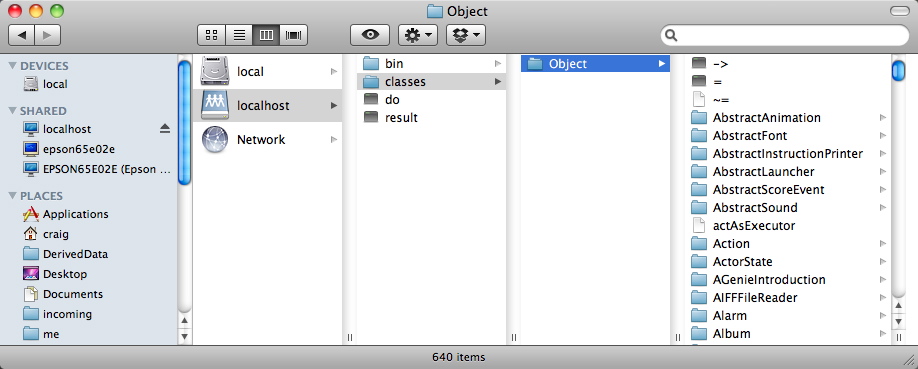
MacOS Context application created
Posted in Context, Spoon with tags context on 28 January 2011 by Craig Latta I’ve created the first of the platform-specific launching mechanisms for the Context 3 release on 20 March, a MacOS application. On each platform, launching an application starts the minimal subject and history memories, and opens a website served by the subject memory using your default web browser. You can then control the subject memory from that website (load modules, quit, etc.).
For MacOS, I wrote an Automator workflow which opens the memories with Finder commands from an AppleScript, and opens the website after that. I saved the workflow as an application, and put the processor (AKA “virtual machine”) and memories in its Resources. This was my first serious application of Automator or AppleScript; I’m impressed!
I’m also writing applications for Ubuntu Linux and Microsoft Windows. I’d appreciate any suggestions about mechanisms to use on those platforms. I’d also love contributions of prettier iconography. :)
 thisContext