Archive for AI

livecoding new AI skills with conversational MCP

Posted in Appsterdam, Caffeine, consulting, Context, livecoding, Smalltalk, SqueakJS with tags , , , , , , , , , , on 24 September 2025 by Craig Latta
A person is speaking, indicated by a speech balloon full of colorful sprockets. A robot, with a head full of colorful sprockets, has grabbed one of the spoken sprockets.
Through conversation, we can add skills to a model as new MCP tools.

The Model Context Protocol gives us a way to extend the skills of an LLM, by associating a local function with natural-language descriptions of what it does, and making that tool available as additional conversational context. Once the model can infer from conversation that a tool should be used, it invokes the tool’s function via the protocol. Tools are made available by an MCP server, augmenting models with comprehensive sets of related skills. There are MCP servers for filesystem access, image processing, and many other domains. New registries are emerging to provide MCP server discovery, and old ones (like npm) are becoming good sources as well.

For someone who can create the underlying tool functions, a personal MCP server can supercharge a coding assistant with project-specific skills. I’ve added an MCP server proxy to my Caffeine server bridge, enabling a Smalltalk IDE running in a web browser to act as an MCP server, and enhancing the AI conversations that one may have in the IDE. I can dynamically add tools, either through conversation or in Smalltalk code directly.

anatomy of an MCP tool

In modeling an MCP tool, we need to satisfy the denotational requirements of both the protocol (to enable model inference) and the environment in which the functions run (to enable correct function invocation). For the protocol, we must provide a tool name and description, and schemas for the parameters and the result. For the Smalltalk environment, we need the means to derive, from invocation data, the components of a message: a receiver, selector, and parameters.

In my implementation, an instance of class FunctionAITool has a name, description, result, parameters, selector, and a receiver computation. The receiver computation is a closure which answers the intended receiver. Each of the parameters is an instance of class FunctionAIToolParameter, which also has a name and description, as well as a type, a boolean indicating whether it is required, and a parameter computation similar to the receiver computation. The tool’s result is also a FunctionAIToolResult, which can have a result computation but typically doesn’t, since the computation is usually done by the receiver performing the selector with the parameters. The result computation can be used for more complex behavior, extending beyond a single statically-defined method.

The types of the result and each parameter are usually derived automatically from pragmas in the method of the receiver named by the selector. (The developer can also provide the types manually.) These pragmas provide type annotations similar to those used in generating the WebAssembly version of the Smalltalk virtual machine. The types themselves come from the JSON Schema standard.

routing MCP requests from the model to the environment

Caffeine is powered by SqueakJS, Vanessa Freudenberg’s Smalltalk virtual machine in JavaScript. In a web browser, there’s no built-in way to accept incoming network connections. Using Deno integration I wrote, a server script acts as a proxy for any number of remote peers with server behavior, connected via websockets. In the case of MCP, the script can service some requests itself (for example, during the initialization phase). The script also speaks Caffeine’s Tether remote object messaging protocol, so it can forward client requests to a remote browser-based Caffeine instance using remote messages. That Caffeine instance can service requests for the tools list, and for tool calls. The server script creates streaming SSE connections, so that both client and server can stream notifications to each other over a persistent connection.

Caffeine creates its response to a tools list request by asking each tool object to answer its metadata in JSON, and aggregating the responses. To service a tool call, if the tool has a selector, it uses the receiver computation to get a receiver, and the parameter computations to both validate each client-provided parameter and derive an appropriate Smalltalk object for it. Now the receiver can perform the tool’s selector with the parameters. If the tool has a result computation instead of a selector, the tool will evaluate it with the derived parameters. A tool’s result can be of a simple JSON type, or something more sophisticated like a Smalltalk object ID, for use as an object reference parameter in a future tool call.

conversational tool reflection

For simple tools, it’s sometimes useful to keep development entirely within a conversation, without having to bring up traditional Smalltalk development tools at all. There’s not much motivation for this when the conversation is in a Smalltalk IDE, where conversations can happen anywhere one may enter text, and the Smalltalk tools are open anyway. But it can transform a traditional chatbot interface.

This extends to the development of the tools themselves. I’ve developed a tool that can create and edit new tools. I imagine conversations like this one:
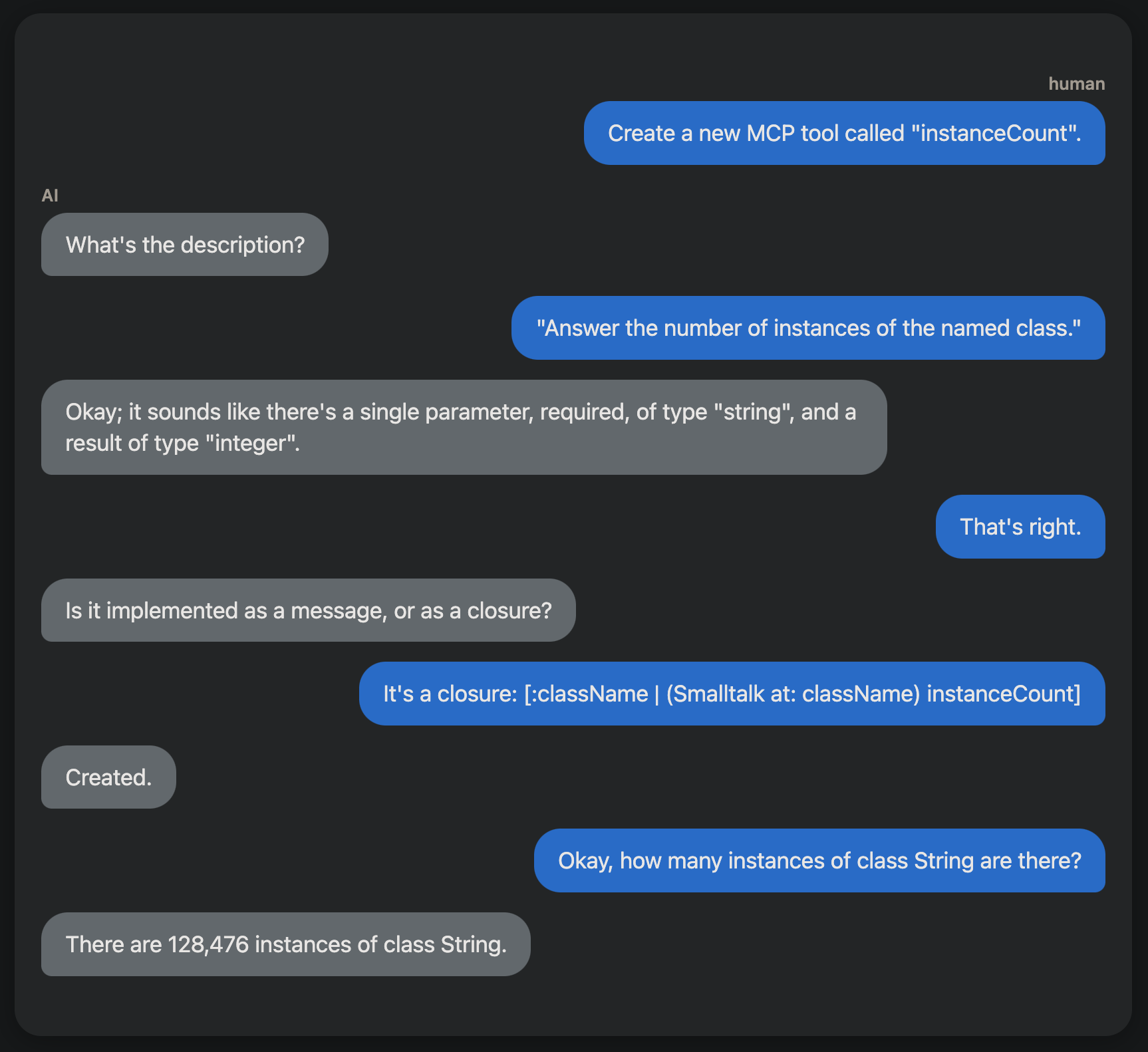
Creating a new MCP tool through conversation.

What would you do with it?

This capability could enable useful Smalltalk coding assistants. I’m especially keen to see how we might create tools for helping with debugging. What would you do?

A new adventure: mechanistic interpretability

Posted in Appsterdam, Caffeine, consulting, Context, livecoding, Smalltalk, SqueakJS with tags , , , , , , , , on 11 August 2025 by Craig Latta
What if we could compose LLMs from reusable circuits?

It’s always bugged me that we can’t explain how large language models do what they do. It makes the models difficult to trust, possibly unsafe to operate, and very difficult to train. If we could identify cognitive structures within a model, perhaps we could compose other models from them, avoiding much of the expense and haphazard nature of our current practice. This is the domain of mechanistic interpretability (MI).

I’ve started a new project to explore this, my attempt to discover circuits and other reusable cognitive structures in LLMs, using interactive tools that visualize what goes on in an LLM as it runs.

interactive inspection inside the minds of models

The project (as yet unnamed) is a livecoded browser-based MI framework, with which I hope to make the field more accessible to everyone. Inspired by TransformerLens and the work of Anthropic, I want to make model inspection easier to start, and more interactive. I also want to help build the MI community, specifically through sharing of results and standardization of circuit expressions. I think we can bring about a new era in transformer-based AI, through the composition of models from reusable circuits, rather than brute-force training from ever-larger sets of questionable training data. We can also pursue increased symbiosis between MI and knowledge representation research.

With current tools, MI remains laborious. Setting up frameworks like TransformerLens is difficult, often requiring complex Python environments with extensive configuration. Access to powerful local GPUs is an absolute requirement. Sharing results with other researchers requires everyone to replicate a complex environment. Worst of all, experiments must be run as large batches of computation, and visualizations are static, making it difficult to develop intuition about model behavior.

While there is a small server setup, the app runs in a web browser; there is no front-end setup. The server and its GPUs need not be local. The architecture lends itself to operation as a service for many researchers at once. Once started, the UI provides access to everything as first-class objects that can be inspected, modified, and composed interactively. Internal model structures become tangible. With the addition of web synchronization frameworks like Multisynq, multiple researchers can explore and share insights about the same live model.

Let’s Collaborate

If you’re a mechanistic interpretability researcher, or are just interested in the topic, please contact me. I’d love to discuss how we might collaborate on this!

a voice-controlled Ableton Live

Posted in Appsterdam, Caffeine, consulting, Context, livecoding, music, Smalltalk, SqueakJS with tags , , , , , , , , , , on 5 January 2025 by Craig Latta
These robots know the value of keeping your hands on your instrument!

I’ve gotten up to speed on AI programming, and it didn’t hurt a bit. After learning the OpenAI chat and realtime APIs, I’m able to integrate generative AI text and speech into Caffeine. I got off to a good start by adding the ability to evaluate natural language with the same tools used to evaluate Smalltalk expressions in text editors. For my next application, I’m writing voice control for Ableton Live. This will let me keep my hands on a musical instrument instead of the keyboard or mouse while using Live.

This ties together my new realtime OpenAI client with an enabling technology I wrote previously: programmatic control of Live from a web browser. The musician speaks into a microphone, and a large language model translates their words into code that Caffeine can run on the Live API. With AI, the spoken commands can be relatively specific (“fade out at the end”) or very abstract (“use foreboding chords”).

The realtime OpenAI client uses a WebRTC audio channel to send spoken commands to the language model, and a WebRTC data channel to answer text as JSON data. I expect I’ll use system prompts instructing the model to respond using a domain-specific language (DSL) that can be run fairly directly by Caffeine. This will take the form of OpenAI tools that associate natural-language function descriptions with function signatures. The AI can deduce from conversational context when it should call a function, and the functions run locally (not on the OpenAI servers). I’ll define many functions that control various aspects of Ableton Live; prompts given by the musician will invoke them.

I imagine the DSL will be a distillation of the most commonly-used functions in Ableton Live’s very large API, and that it’ll emerge from real DAW use. What would you want to say to your DAW?

Context-Aware AI Conversations in Smalltalk

Posted in Appsterdam, Caffeine, consulting, Context, livecoding, Smalltalk, SqueakJS with tags , , , , , , , , , , on 3 December 2024 by Craig Latta
There’s a lot of Smalltalk knowledge in the pre-training data of most LLMs.

I’ve been stumbling toward a “good enough” understanding of Smalltalk by an AI large language model, and Smalltalk tools for integrating conversations into the workflow. So far, I’ve been doing this through model fine-tuning with English system prompts, without resorting to code at all. I’ve been impressed with the results. It seems the pre-training that the OpenAI gpt-4o model has about Smalltalk and Squeak is a decent basis for further training. I evolve the prompts in response to chat completion quality (usually by applying more constraints, like “When writing code, don’t send a message to access an object when you can access it directly with an instance variable.”).

I wanted to converse with the language model from any text pane in Squeak, via the classic “do it”, “print it”, and “inspect it” we’re used to using with Smalltalk code. I changed Compiler>>evaluateCue:ifFail: to handle UndeclaredVariable exceptions, by delegating to the model object underlying the text pane in use. (It’s usually an UndeclaredVariable exception that happens first when one attempts to evaluate an English phrase. For example, “What” in “What went wrong?” is unbound.) That model object, in turn, handles the exception by interpreting the next chat completion from the language model.

The model objects I’ve focused on so far are instances of Debugger and Inspector. One cute thing about this approach is that it records do-its for English prompts just like it does for Smalltalk code, in the changes log. Each model can supply its own system prompts to orient conversations, and can interpret chat completions in a variety of ways (like running Smalltalk code written by the language model). Each model object also keeps a reference to its most recent chat completion, so that successive prompts are submitted to the language model in the context of the complete conversation so far.

With all this in place, evaluating “What went wrong?” in a debugger text pane gives surprisingly correct, detailed, and useful answers. Running the code answered to “Write code for selecting the most recent context with a BlockClosure receiver.” manipulates the debugger correctly.

Next, I’m experimenting with prompts for describing an application’s domain, purpose, and user interface. I’m eager to see where this leads. :)